Blog

  • Automating Case Routing Between Onshore & Offshore Teams Using Salesforce

    Automating Case Routing Between Onshore & Offshore Teams Using Salesforce

    Automating Case Routing Between Onshore & Offshore Teams Using Salesforce

    About the Client

    Our client is a leading American information technology company with a strong presence across marketing, risk management, communication, security, registry, and professional services. For more than two decades, this company has been delivering real-time, industry-leading solutions to businesses worldwide. 

    Key Facts:

    • Listed on the Australian Stock Exchange (ASX) 
    • Serving 8,000+ global clients, including multiple Fortune 100 companies 
    • Recognized for its innovation in enterprise IT solutions 

    Business Challenge

    The client manages high-volume customer cases and queries across multiple products and regions. Their operational model involves two primary teams: 

    • Onshore Team (located in the U.S.) 
    • Offshore Team (support team in a different geography) 

    How the Existing Process Worked

    1. Cases were initially assigned to one team (offshore or onshore). 
    2. After a defined time period or escalation, cases needed to be transferred to the other team for further handling. 

    The Problem:

    This case reassignment process was manual and prone to delays and errors, leading to: 

    • Missed SLAs 
    • Increased operational burden on BPO teams 
    • Customer dissatisfaction due to delayed responses
       

    The client’s major concern: 

    “If a case starts with our offshore team, how can we ensure it is automatically routed to our onshore team after a set time without manual intervention?” 

    Our Solution: Automated Case Routing with Salesforce

    To address this challenge, the Round Robin Distributor (RRD) Team undertook a detailed analysis of the client’s business processes and identified gaps in case routing and workflow automation. 

    Key Steps in Our Approach

    • Conducted requirement workshops with onshore and offshore service teams 
    • Designed a solution to enhance the existing ‘Reassign Case’ functionality within Salesforce 
    • Implemented a custom automated workflow for case transfer between teams based on time-based triggers 

    Solution Highlights

    • Seamless Integration: Worked within the client’s existing Salesforce setup, integrating with other tools in their ecosystem 
    • Automated Case Transfer: Cases are now automatically routed from offshore to onshore teams (or vice versa) without manual effort 
    • Configurable Rules: Admins can define time-based rules for case reassignment, reducing complexity 
    • Error-Free Workflow: Eliminated manual errors by introducing a fully automated routing system


    This solution leveraged Salesforce automation capabilities and RRD’s flexibility to create an open-platform experience for the client. 

    Business Impact & Results

    The implementation resulted in major improvements in operational efficiency and customer satisfaction

    • Enhanced SLA Compliance – Cases are routed automatically, reducing response times significantly 
    • Improved Customer Experience – Customers receive faster resolutions, leading to higher satisfaction levels 
    • Scalable Operations – BPO teams experienced reduced workload, enabling the client to handle higher case volumes efficiently 
    • Error-Free Processes – Automation minimized human error in case transfers 
    • Streamlined Team Collaboration – Onshore and offshore teams now work in sync with automated workflows 

    Benefits at a Glance

    • Automation – Eliminates manual routing and reduces dependency on human intervention 
    • Efficiency – Saves time, improves productivity for both teams 
    • Flexibility – Rules can be easily updated to adapt to changing business requirements 
    • Visibility – Integration with Salesforce reporting and dashboards for better tracking 

    Why This Solution Works for Global Enterprises

    This solution is ideal for companies that manage distributed teams and high-volume service cases. Automated workflows in Salesforce not only improve internal efficiency but also enhance customer engagement by reducing delays and errors. 

    Looking to automate your case routing in Salesforce?

    schedule a demo
    [my_sidebar]

  • Round Robin Distribution: Better alternative to Omni channel

    Round Robin Distribution: Better alternative to Omni channel

    Round Robin Distribution: Better alternative to Omni channel

    Round Robin Distributor (RRD) app overcomes the limitations of Salesforce Omni-Channel and optimizes and simplifies complex routing logics for your Sales & Service Teams.

    RRD tool is a robust, highly customizable, and open-platform solution for your distribution automation solutions and integrates with your marketing and sales automation apps like Marketo, Hubspot, and even with existing Salesforce Lead Assignment rules and Salesforce Case Assignment rules.

    Round Robin Distributor addresses the following concerns for you:

    1. Role based Assignment- Assign lead to multiple people working at various positions automatically by defining rules for distribution. For Instance, in Education Industry, you might want to assign Program Managers, Financial Advisor, Academic Advisor along with a Case Owner/ Contact Owner on a student which can be round robin’ed with Round Robin Distributor by simply defining the criteria for allocation.

    2. Re-assign Cases to another Queue–  If everyone in the selected Queue has either declined the case, capacity is exhausted or unavailability of agents, then the cases are routed to the queue with the second highest priority matching the rules logic defined

    3. Priority based handling of users and queues – Through Round Robin Distributors, Administrators can define priority to case teams, users and even queues based on which the inbound record can be routed to the best available agent.

    4. Distribution of leads and cases to the queue–  Leads & Cases can be round robin’ed between multiple queues based on the defined attribute for the incoming leads and cases through any integration or manual upload of inbound data.

    5. Criteria based routing to queues – Complex AND & OR logic can be used between various attributes and corresponding values can be defined in RRD Teams for efficient allocation for organizations with complex team structures.

    6. Ability to handle High– priority cases even if the Capacity is exhausted – For organizations, customer experience is of high value and to cater to high value cases, the agents should be able to respond them on priority even if the limit has been exhausted.

    7. Round Robin routing- method which is different from the routing method used in omni channel.

    8. Eliminates- the issue with Triggers and Workflow rules not working on updating by Omni-Channel.

    9. Handling relationship-based assignments– Useful for routing leads and cases as you want to assign them to the same person working with another case/lead from the same client.

    When to not use Salesforce Omni-Channel?

    This salesforce out-of-the-box functionality does come up with some limitations which makes it complex to use with other integrations and organizations looking to use advanced routing solutions for their teams.

    1. In a help article by Salesforce, it is mentioned that when Omni-Channel agents are online and see an error “LIMIT_EXCEEDED, limit exceeded”, it is possible that the queue has hit the maximum limit of 200000 records. New work items will not be added to the queue or routed to agents, until the volume has lowered.

    2. According to this Salesforce Article, If a work item requires certain skills, but no agents have those skills, then the work item isn’t routed.

    3. Omni-Channel is not capable of assigning records to the specific agent or rep based on past relationships with the clients based on the attribute of Salesforce incoming leads, cases, accounts, opportunity and any custom SFDC object.

    4. A record cannot be re-assigned to another queue if the case has not been owned within the

    5. If the capacity of volume assigned to an agent is exhausted, high priority cases or hot leads couldn’t be assigned to the best available rep which impacts the business throughput

    Maybe You Like

    Round Robin Distribution: Better alternative to Omni channel

    Round Robin Distribution: Better alternative to Omni channel

    Salesforce Round Robin Lead Assignment *Best Practice* with RRD

    Salesforce Round Robin Lead Assignment *Best Practice* with RRD

    Salesforce Lead Distribution – Efficient assignment through Round Robin Distributor

    Salesforce Lead Distribution – Efficient assignment through Round Robin Distributor

    Effective Web Leads Tracking for Inbound Sales Team to Optimize Sales Funnel

    Effective Web Leads Tracking for Inbound Sales Team to Optimize Sales Funnel

    Managing High-Priority Support Tickets like an Ace in Salesforce

    Managing High-Priority Support Tickets like an Ace in Salesforce

    Salesforce Lead and Case Assignment Rules Lightning

    Salesforce Lead and Case Assignment Rules Lightning

    [my_sidebar]
  • Salesforce Round Robin Lead Assignment *Best Practice* with RRD

    Salesforce Round Robin Lead Assignment *Best Practice* with RRD

    Salesforce Round Robin Lead Assignment *Best Practice* with RRD

    Assuming you are a Salesforce Admin/ Sales Manager at your company, you want a solution to route the inbound leads to the right and the most suitable sales representatives. You are the one who has to decide who gets the next incoming lead, and hence, you need a full proof solution to your constant problem of automating the process intelligently.

    Out-of-the-box Salesforce does not provide the ability to automate this process through Round Robin Algorithm. A lot of businesses today are seeking flexibility to customize and control the process of round robin lead assignment for their Salesforce orgs. You are just one read away for automating Salesforce Lead Assignment for your business.


    Let us understand how Salesforce round robin lead assignment is configured and get started with automating your lead management in Salesforce

    1. Assignment Groups/ Lead teams: Lead Assignment groups are a set of users in Salesforce (Sales representatives) who are put together as a team due to certain characteristics and skills they possess for lead management and associated issue resolution. Assembling and arranging the sales rep in your organization can be done based on territory managed (zip code, state, city, country, etc.), spoken language, products being handled, level of experience, priority hot leads, and much more.
    Popularly used clustering approaches in other organizations leading to a path of enhanced customer service and probability of a higher conversion ratio:

    1. The assembly line approach (based on responsibility)
    2. Product based Pods
    3. Skills based clustering

    2. Reps’ Availability: Sales representatives availability can vary based on the work shifts. With COVID, the concept of remote teams and offshore teams has kicked in and Administrators need to control the assignment given the work schedule and day offs of a sales agent. Controlling this would boost the sales throughput and optimize the pipeline thereby reducing the conversion time.

    3. Load Balancing & Weighted Allocation: Workload based distribution of leads to individual reps helps control burnout and avoids leads getting stagnated into the company’s sales queue. To improve response time, the leads should be routed to the reps (without cherry-picking) in a round robin manner. With this assignment method, the capacity of workload with each rep must be handled.

    4. Custom Schedule to track Assignment: The assignment can be switched on and off automatically to manage assignments for the reps that are not available for a certain duration. The leads can’t be waiting for reps to log in. This would eventually reduce the burden of manual work for the sales team leads and they would have increased hours for focusing on the actual and crucial tasks at hand.

    5. Priority based Assignment: Based on the urgency of a lead to be handled and the most suitable team to process it, the priorities can help decide which team/ user/ queue should be routed the which lead. By taking this into consideration, productivity levels can be enhanced, team effectiveness and overall performance too can be boosted.

    The above may not be a definitive and restricted list to follow but is definitely a starting point for addressing Salesforce Lead Assignment issues. With our Enterprise based Round Robin Distributor, we believe that any solution specific to Salesforce lead assignment automation can be addressed hence optimizing your end to end lifecycle and lead management process!

    For more details on how

    Maybe You Like

    Round Robin Distribution: Better alternative to Omni channel

    Round Robin Distribution: Better alternative to Omni channel

    Salesforce Round Robin Lead Assignment *Best Practice* with RRD

    Salesforce Round Robin Lead Assignment *Best Practice* with RRD

    Salesforce Lead Distribution – Efficient assignment through Round Robin Distributor

    Salesforce Lead Distribution – Efficient assignment through Round Robin Distributor

    Managing High-Priority Support Tickets like an Ace in Salesforce

    Managing High-Priority Support Tickets like an Ace in Salesforce

  • Salesforce Lead Distribution – Efficient assignment through Round Robin Distributor

    Salesforce Lead Distribution – Efficient assignment through Round Robin Distributor

    Salesforce Lead and Case Assignment Rules Lightning

    What are assignment rules in Salesforce?

    Salesforce Lead Assignment Rules and Salesforce Case Assignment Rules are used to automate lead capture and service support processes by assigning incoming leads and cases to the right owner (User or Queues). Based on the defined formula condition and the criteria set the assignment is done to the users or entered into the queue.

    To quote an instance from the actual setup: For web-to-lead or for email-to-case, the lead or case can be assigned on the basis of email subject or lead source to the defined user such as a sales rep.


    Top 7 Use-Cases for Salesforce Case & Salesforce Lead Assignment Rules

    Assignment rules are popularly used in organizations with complex structures to automate and make the assignment process more efficient. Rule-based lead and case assignment enable managers to save time and focus on streamlining sales funnel and eventually the bottom line. Here are some handpicked examples of how salesforce assignment rules are being used around

    1. Round Robin lead and case assignment rules- Round Robin assignment for leads and cases can be simulated for your Salesforce org in simple steps by setting up a Round Robin ID (Formula type field on the Lead object) using the steps mentioned in this article for implementing Salesforce Round Robin. Round robin assignment ensures a fair distribution of leads and cases to your sales & service teams eliminating cherry-picking of records by certain reps especially if the team doesn’t have past performance data for reference.

    2. Assignment based on Lead Source- Sales teams can handle incoming lead distribution from various sources in a matter of seconds and sort order of assignment to manage multiple offshore and inshore teams with inbound sources like web, emails, phone, social media campaigns, google ad campaigns, and many more.

    It helps support teams and sales teams to segregate reps into groups to manage such a diverse range.


    3. User Status based assignment- For organizations operating internationally, this could be used to maintain business throughput amongst remote and geographically dispersed teams working in shifts. The leads and cases can be transferred across as the working shift ends to the team online which helps to close and convert tickets based on configurable assignment rules.

    4. Product Interest-based lead assignment- Helpdesks and support centers receive hundreds of calls on a daily basis and it gets hard to manage customer satisfaction as 70% of customers want to talk to the same agent on placing a call again. It’s essential to map agents to the customer based on the product inquiry, product feedback, installation, breakdown, equipment complexity, etc. and the product which the customer is using or is in process of purchasing.

    5. Skill, Location and Experience-based assignment- Rule-based assignments can be done based on the agent skills (spoken language, the domain of expertise, etc), on reps’ and customers’ locations (city, state, country, zip codes, postal code, time zones, reps territory). Assignments can also be based on the experience; more weight could be assigned given the capacity of managing clients and giving the rep more priority.

    6. Re-assignment of neglected leads & cases- As the load of inbound data increases, leads and cases add up to a bottleneck which develops very quickly. When inbound lead volume is on a rise, the leads add up to the queue and it’s essential to distribute it rapidly to the sales teams to minimize response time. Cases when an agent has exhausted the limit to hold tickets, they can be re-assigned to other members in the team to the next most qualified agent. It helps salesforce admins to maximize the overall performance of sales teams.

    7. Load balancing & Capping- Volume management is a key part of sales management and it improves teams’ productivity by allocating a certain number of cases and leads to the reps. It could form big trouble when ignored and hence, with the growing awareness, system administrators are looking to find solutions that could cater to this need.

    How Round Robin Distributor app can help with implementing these use cases in Salesforce?

    1. RRD has configurations defined and customized to handle all possible case and lead sources, let’s say web-generated leads can be assigned to case teams and case queues with criteria having ‘source equals web’ for effective salesforce case distribution amongst agents.

    2. Custom round-robin schedules and calendars are used by Round Robin Distributor for salesforce lead distribution and case routing based on the availability at the time distribution are scheduled or on a real-time basis. Monitoring reps schedule and activity is also possible with user status reports and helps Admins in auditing the assignments done in a certain interval.

    3. Round Robin Distributor’s case assignment rules in salesforce are defined to handle scenarios (product based lead and case routing in salesforce) efficiently fulfilling the main goal of effective automation of your lead and case routing to the best available rep in the suitable teams.

    4. Round Robin Distributor helps managers to assign capping on a team and user level.

    As you can analyze from the above tips and methods, that Round Robin Distributor could prove to be the most powerful tool for your sales and service teams in saving the day. RRD is available for download on AppExchange and the team is available 24 X 7 to solve any use case and simulate the same for your business requirements on the go.

    Maybe You Like

    Round Robin Distribution: Better alternative to Omni channel

    Round Robin Distribution: Better alternative to Omni channel

    Salesforce Round Robin Lead Assignment *Best Practice* with RRD

    Salesforce Round Robin Lead Assignment *Best Practice* with RRD

    Salesforce Lead Distribution – Efficient assignment through Round Robin Distributor

    Salesforce Lead Distribution – Efficient assignment through Round Robin Distributor

    Effective Web Leads Tracking for Inbound Sales Team to Optimize Sales Funnel

    Effective Web Leads Tracking for Inbound Sales Team to Optimize Sales Funnel

  • Effective Web Leads Tracking for Inbound Sales Team to Optimize Sales Funnel

    Effective Web Leads Tracking for Inbound Sales Team to Optimize Sales Funnel

    Effective Web Leads Tracking for Inbound Sales Team to Optimize Sales Funnel

    Why is every company trying to optimize its Lead/ Sales Tracking?

    Lead management is defined as a set of procedures/ methods of managing the incoming leads efficiently. It involves categorizing the lead from the moment it enters the system, to tracking the behavior and affirming by conversion of lead into an opportunity. It is crucial to the organizations as with the increasing amount of inbound data in CRMs, it becomes complicated to focus on each incoming lead which results in the need for a robust and open platform solution to drive the process effectively. The diagram below depicts steps in the lead management system

    buyers and increase both the quantity and quality of touches on those buyers.

    Every day your marketing campaigns might generate a lot of traffic via Email Campaigns, Webinars, Social Media Campaigns, Paid Advertisements, Demos, Organic Search, etc. But do you have an efficient way to store/ capture the leads into a box for your Sales Teams to work on?

    Usually, leads generated from multiple sources like lead generation forms (email alert), emails, referrals (emails), etc. are received in the form of a mail and hence there is a high probability of these mails getting lost in the clutter.

    And, did you know that 19% of buyers want to connect with a salesperson during the awareness stage of their buying process when they’re first learning about the product, 60% during the consideration stage, and 20% want to talk to them during decision stage?

    The right question at this stage should be whether we are ready to cater to these leads at different stages into a much efficient system?

    In this article, let us discuss Lead Generation and Lead Capturing to Lead Distribution from Website in more details and try to identify an effective way to store and accommodate their needs:

    Adding Lead Generation Forms to the page which generate the most traffic

    Let’s consider Salesforce as the CRM which the company is currently using and map out the steps in the process of Managing Leads through it.

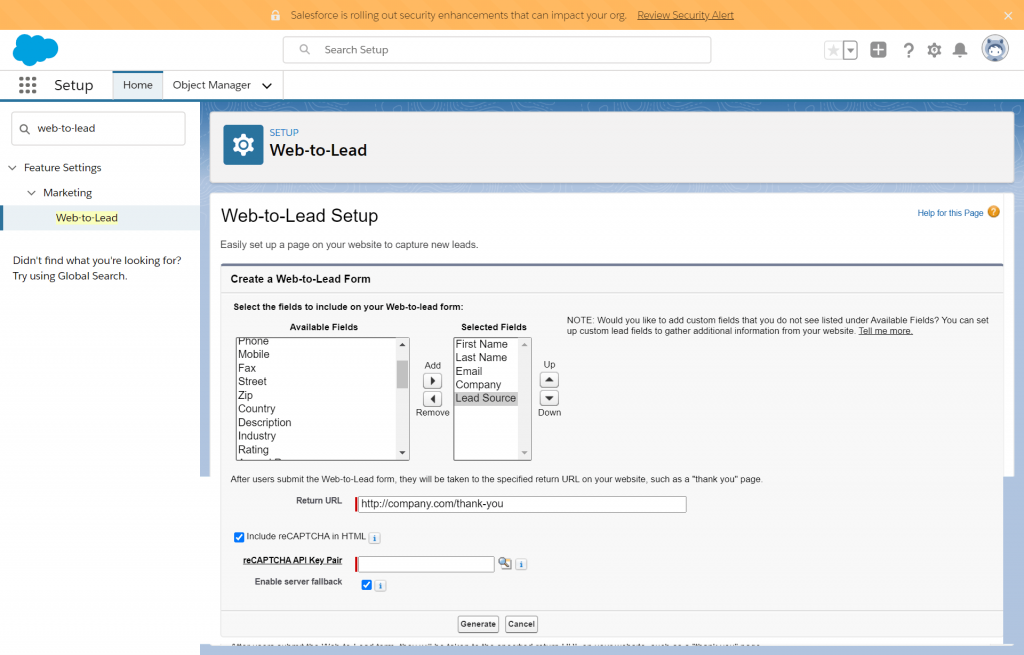
    Generate or create a web to lead form to embed in your website

    Based on the classification that the organization prefers, please add fields to your form. For instance, in this, I will classify my leads based on the lead source.

    Define Email Templates

    In Salesforce, Email Templates can be created in text only, HTML, Custom (without a letterhead), and VF format. Creating an email template ensures standardization by enabling consistent messaging and increases the productivity of the team responsible by saving them time in typing and sending the mailers. These are some quick steps by which you can easily set up the templates:

    1. Folder- Create a new Email Template Folder and assign its public access and permissions to the users accordingly. Permissions can also be defined separately for Public Groups and Roles. You have an option to add and modify out-of-the-box email templates to the folder.

    2. New Letterhead- To bring uniformity to the table, start with creating the letterhead, which takes care of color scheme, logo, header and footer settings, etc.

    3. New Template- Define the template name and encoding options (Informs Email Service of how to read the content in the email body). State the subject line you would want to use. Type your content in the message body and add merge fields to enhance the automation process

    Lead Tracking software

    Create Workflow Actions

    The workflow in Salesforce lets the user automate internal procedures to save time across other critical implementations and enrichment procedures. In other words, the workflow is a business logic engine that triggers when specific criteria are fulfilled. There can be two types of actions:

    1. Immediate Actions

    2. Time-dependent Actions

    Let’s start by creating Email Alerts, and define the object which is being targeted, here, Lead and set up the template created in the previous step and select the recipient type.

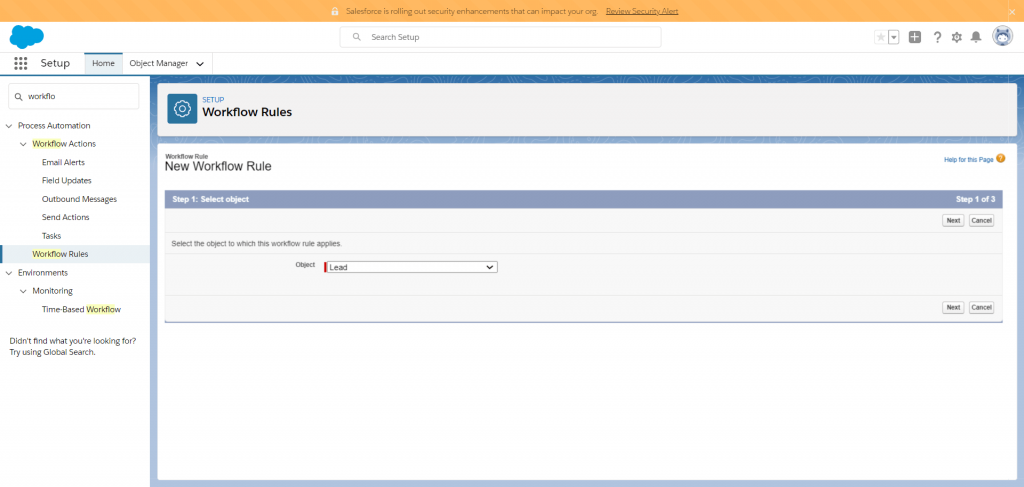
    Set-up Workflow Rules

    Since we are working on Lead Management, define the object as lead and proceed to the next step where rule, name, and criteria to trigger workflow action will be established.

    Lead Assignment Rule

    Following the above-listed steps, you would be able to see all the leads in your Sales

    Let’s jump on to Lead Distribution now and try to throw some light on “Why is Lead Distribution an important step?”

    Lead Distribution refers to allocating lead references to Sales Team based on various factors listed below:

    1. Geography: Address, Zip Code, City, State, Country, Continent, Longitude, Latitude, etc.
    2. Account Details: Company Name, No. of Employees, Hubspot Score, etc.
    3. Date/ Time: Lead Converted, Lead Load Time, Status Change, Last Viewed and Updated Date
    4. Contact Details: Full Name, Email ID, Phone, Fax, etc.
    5. Lead Associated Fields: Lead ID, Product Interest, Status
    6.  Sources: Phone, Web, Email, Reason, Subject Line, and Referrals.

    This process may seem to be cumbersome, tedious, and time-consuming. Managers spend a lot of their productive time in timely data distribution, managing lead turnaround time, administering teams’ time schedules, and eliminating issues of cherry-picking of leads.

    Round Robin Distributor (RRD), the native Salesforce Application helps you make such complex decisions in a snap of the fingers on a real-time basis. Lead Distribution and Assignment based on configurable business logic is all you need to make the best use of your productive time.

    Let’s take a quick ramble through Lead Distribution journey being made efficient through Round Robin Distributor:

    Round Robin Distributor

    1. RRD helps you assign inbound records based on configurable lead assignment rules and logic.
    For instance, we want to assign ownership of lead records to a user/ team, which already has a business relationship with a company in the past.

    2. Round Robin Distribution method to distribute records to salesforce teams and users based on defined criteria.
    Take the reference of a Card Dealer (RRD) here. Suppose he/she is distributing cards (records) to 5 players (users/teams) in a game (team/system), then if 1st Card goes to Player 1, and 2nd Card goes to Player 2 and so on up to Player 5. Now for the 6th Card, the dealer would again distribute it to Player 1, 7th Card to Player 2, and so on.

    3. Ability to filter individual records from Relationship-based assignment and much more.

    Aren’t you excited already to give it a try? To simulate your use-case, try out Round Robin Distributor today for a month free.

    Hope this article provides you enough insights from shifting from traditional email-based receipts and move the lead management process to CRM constructively. Stay tuned to the page to receive more information regarding aligning all your processes to Salesforce.

    Maybe You Like

    Round Robin Distribution: Better alternative to Omni channel

    Round Robin Distribution: Better alternative to Omni channel

    Salesforce Round Robin Lead Assignment *Best Practice* with RRD

    Salesforce Round Robin Lead Assignment *Best Practice* with RRD

    Salesforce Lead Distribution – Efficient assignment through Round Robin Distributor

    Salesforce Lead Distribution – Efficient assignment through Round Robin Distributor

    Effective Web Leads Tracking for Inbound Sales Team to Optimize Sales Funnel

    Effective Web Leads Tracking for Inbound Sales Team to Optimize Sales Funnel

  • Managing High-Priority Support Tickets like an Ace in Salesforce

    Managing High-Priority Support Tickets like an Ace in Salesforce

    Managing High-Priority Support Tickets like an Ace in Salesforce

    That ticket requires immediate attention! If you are looking to optimize handling of urgent cases (tickets) using Salesforce as a helpdesk ticketing system, then you have landed at the perfect place.

    As your client base grows, you would require a customizable solution to the available functionalities that a platform can offer. With the growing awareness, many organizations have adopted or switched to using Salesforce as their Helpdesk solution. Salesforce Service Cloud streamlines the process of case (ticket) management as the agents get connected through cloud. With remote working teams, it becomes a relief with the ability to resolve customer request from just anywhere connecting to all the raised questions and activities.

    Round Robin Distributor (RRD) for Salesforce enhances you experience of optimizing your pipeline for a better customer service experience and enhanced retention levels.

    With RRD, the path to achieve the desired outcomes with customer success becomes efficient for the following features it has to offer:

    1. Manage Ticket Volume- With RRD tool, service teams can control the number of open tickets a person can handle in a specified period. Let’s consider an example of a Support Desk team which has 10 agents working simultaneously on the incoming tickets, then we can introduce capping on intervals for the open cases in order to control the uneven distribution and burnout caused due to indefinite handling of tickets in a shorter span. According to certain studies, this aids in resolving for the First Level Resolution Rate.

    2. Omni-Channel Support- Your customers can reach out for support from a wide variety of communication channels, specially during COVID times. The channels range from social media, website support forms, live chat on websites, emails and all the way to traditional phone support. Using Salesforce, the organization wants to track all these case sources on a real-time basis which can be automatically routed to the right agent based on the source and skills which could be configured in RRD without any technical knowledge.

    3. Priority-based routing- Ticket priority helps organizing the tickets based on the urgency given the customer’s needs and past client relationship with the organization. The tickets can be classified as low, medium, and high priority and could be routed to an agent (given the high priority for a service case) even if the user-level capping is full.

    4. Auto Re-assignment of tickets- For geographically dispersed and remote teams working in varied time shifts, the re-assignment of tickets can be triggered automatically as the shifts change so as to optimize the transfer process and optimize the turnaround time for SLAs. With RRD, the process to automate assignment can be automated for the business requirements based on the specific requirements put forward by the organization.

    5. Real-time Alerts- As soon as the agent is assigned a support ticket by automated routing, a task gets created and a notification alert is created for the user.

    6. Maintain default Queue- Increasing load of inbound data can lead to inefficient systems unable to hold more than a certain number of records at a time. Manager would have to eventually invest time to assign the records to the right team, but with the app, distribution works in real time with an option to run in batches from every 10 minutes to nightly from the queue to the best available agent

    7. Account-based ‘Relationship Assignment’- useful for cases as you want to assign them to the same person that is currently working with another case/lead from the same client/ company. This feature enables support agents to maintain business relation with the clients cases mapping based on territory, product or service types, skills, company information, etc. if the agent has been working on a similar record.

    If you want to know more and looking for a solution to fit your service team, fill the contact form or simply download a trial version of RRD for your Salesforce org and our account team will reach out to you for more assistance.


    Maybe You Like

    Round Robin Distribution: Better alternative to Omni channel

    Round Robin Distribution: Better alternative to Omni channel

    Salesforce Round Robin Lead Assignment *Best Practice* with RRD

    Salesforce Round Robin Lead Assignment *Best Practice* with RRD

    Salesforce Lead Distribution – Efficient assignment through Round Robin Distributor

    Salesforce Lead Distribution – Efficient assignment through Round Robin Distributor

    Effective Web Leads Tracking for Inbound Sales Team to Optimize Sales Funnel

    Effective Web Leads Tracking for Inbound Sales Team to Optimize Sales Funnel

  • Salesforce Lead and Case Assignment Rules Lightning

    Salesforce Lead and Case Assignment Rules Lightning

    Salesforce Lead Distribution – Efficient assignment through Round Robin Distributor

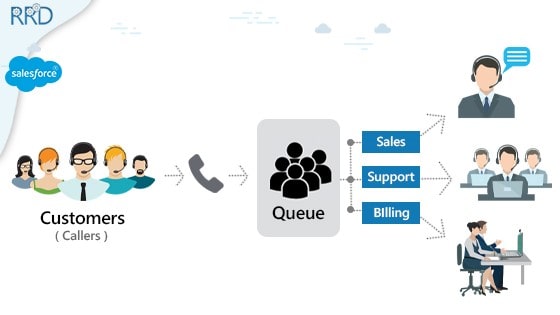
    Lead distribution – Lead distribution is a set of process through which all incoming leads are assigned to a skilled and qualified sales representative. The business requirement in doing so is to reach out to the prospects in limited time and putting their best representative to work.

    Based on a recent Harvard study, it has been found out that if you follow up with a lead within five minutes of its generation you are 9 times more likely to convert that lead. Businesses across various industries are recommended to streamline their lead response process which can bring a 10% increase in their overall revenue. Over the years, businesses have tried to achieve quicker response time and to get their lead distribution process streamlined through various systems and software

    There are multiple custom relationship management software out there that provide the functionality of lead distribution. But salesforce stands apart among them due to its flexibility and customization abilities. Salesforce not only helps the business by providing seamless integration with the current business system but also provides your business with intuitive and insight generating reporting capabilities.

    Now a business can have multiple sources through which leads can be generated. It can be through web, chat, emails, events, partner portals etc. Out of the box, Salesforce provides you the ability to build Lead assignment rules to assign leads to a small team. But as you scale, salesforce lead distribution based on schedule, geographies become complex and salesforce lead assignment rules wouldn’t be able to handle such complex logic. To provide businesses the ability to go one level deeper with their salesforce lead distribution logic, we have an automated intuitive tool such as Round Robin Distributor which you can easily download from Salesforce App exchange

    Why is it necessary to have a Salesforce lead distribution app for your Business?

    There are multiple business use cases that can’t be handled through lead assignment rules that salesforce provides out of the box. To cover those in detail, we have listed a set of functionalities round robin distributor provides below:

    1. Schedule based Distribution – It’s a prominent need for a business to assign leads to a representative when he/she is available so that there should be someone to quickly reach out to the prospect or else the lead would be idle for a longer period. With Round Robin distributor, you can assign leads to your sales representatives based on their specific schedule.
    In addition to schedule-based distribution RRD also provide an added functionality to assign leads to the users that are currently logged in the system. We refer them as online users – this functionality keeps a check so that the leads are assigned to only users that are currently available.

    2. Geography Based Distribution – From a business perspective, it is sometimes necessary for the business to assign leads to the representatives based on the region they belong to. This means there should be a way to provide segregation between leads that are assigned to your offshore team from the leads that are assigned to your onshore team. You can also go one level deeper and segregate teams within a country based on various zip codes.

    3. Skipping weekends – This is where the concept of Salesforce Queue pops. With Round robin distributors we provide you a functionality to accumulate your leads in a bucket/queue during weekends. Doing so once your team of representatives are back on Monday you can manually or through our scheduled automation can start assigning them leads in round robin fashion.
    This helps the business to segregate and plan for the leads that they receive at the start of the weekend and can work around the schedule that they need to set for their individual sales representative.

    4. Team criteria – To automate the business workflow, we have a concept of a team of individual sales representative. Teams provide you an opportunity to segregate your users in terms of their location, capabilities, schedule etc.

    5. Relationship based criteria – Based on our past business use cases, we have seen that the past relationships can be a major factor for a company in their lead assignment. For e.g. Leads from a certain company can be assigned to the same user, it was last assigned to.

    6. Open to customization – It is important for an app to be customizable based on client needs. Round robin distributor is currently constructed in such a way that any new business workflows can be accustomed. We understand that some businesses can request for a few changes in the app based on their business needs, which isn’t possible to cater to in other legacy systems, but round robin distributor takes care of such needs.

    7. Reporting – With round robin distributors, you will be able to see how many leads are assigned to the representative in the past day, week, or month. You will be able to see if the sales representative followed up on the lead and what was his response time.

    8. Notification to the user – It is important for your sales representative to know when a lead is assigned to him/her. Round robin distributor provides you the capability to notify your user either through a task which is created when a lead is assigned to them, or they can be notified through a mail.
    This will help the sales representative to be on track and do not miss any high priority leads.

    9. Reassignment of leads – Managers have the capacity to look for sales representatives that have been assigned a lead for longer duration and are still not working on that specific lead. In such cases, you can reassign the lead back to the queue so that it can again be redistributed through round robin logic.

    10. Prioritization of teams – If you have multiple teams that works on similar criteria such as geography you can segregate your teams based on priority. By doing so, one set of your users would have the ability to receive the high priority leads first and once this limit is exhausted, the next set of users that are lower in priority level start receiving the leads.

    11. Volume management – With round robin distributor, you can manage the volume of leads that should be assigned to your specific team in a day/week/ month. By doing this you can get a track of incoming work scheduled for your team.

    To conclude, round robin distributor is a one stop solution to cater to all your inbound distribution logic. It is a must have tool for all your salesforce lead distribution needs. We are proud to say that we at Mirketa have provided solution to clients across various industries such as healthcare, education, transportation, retail, IT services etc. through our round robin distributor app.

    Maybe You Like

    Round Robin Distribution: Better alternative to Omni channel

    Round Robin Distribution: Better alternative to Omni channel

    Hello world!

    Salesforce Lead Distribution – Efficient assignment through Round Robin Distributor

    Salesforce Lead Distribution – Efficient assignment through Round Robin Distributor

  • What is Round Robin?

    What is Round Robin?

    What is Round Robin?

    Round Robin Algorithm

    le caboodle about it.

    In general terms, Round Robin refers to ‘a series or a sequence’. Consider the example of a card dealer here and assume that there are 4 people sitting around a circular table including that card dealer, Andrew. Let us say Andrew distributes the card to Player 1, then second card to Player 2, third card to Player 3, and then fourth card to Player 4. Now while distributing fifth card, he will again start dealing it to Player 1, sixth card to Player 2, and so on.


    Round Robin Scheduling

    For all you IT enthusiasts out there, Round Robin is an algorithm designed to fulfill the agenda of virtual load balancing in operating systems, and network communications by distributing elements to the respective groups in a circular manner to control network traffic . For instance, a round-robin load balancer distributes traffic (client requests) across a pack of servers in a loop. There are variants of the traditional round robin algorithm that handle load, storage and even computing capacities namely weighted and dynamic round-robin.

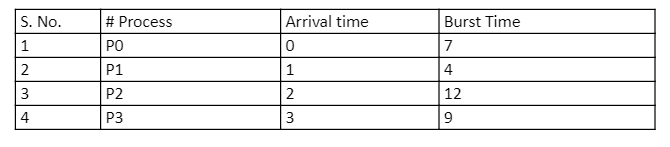
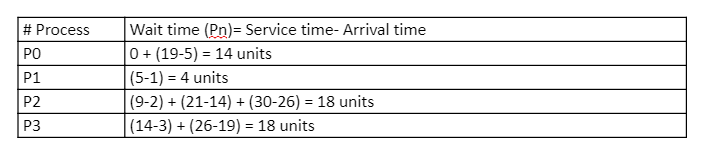
    Being preemptive, the round robin scheduler would push the processes out of the CPU after a certain time quantum (fixed time allocated to each process) defined. Context switching comes into play to save the preempted processes state. For example,

    salesforce load balancing

    Quantum: 5 

    salesforce round robin

    salesforce round robin

    Average waiting time= Avg (14, 4, 18, 18) = 13.5 units 

    Salesforce Round Robin distribution and assignment of leads/ cases

    In Salesforce, Round Robin logic implies in assigning and distributing inbound records (leads, cases, accounts, and opportunities) to teams, users, and queues in a circular and logical manner. Similar to the example stated above, assume a team of 5 Sales reps. 1st lead gets assigned to Agent 1, 2nd to Agent 2, and then after the turn gets completed, 6th lead is assigned back to Agent 1. Using Salesforce, you could create a field (formula type) on Leadsà Mod(Value({!Lead_Number__c}), #reps)+1

    Though there are limitations to implementing Round Robin Logic using Salesforce out of the box functionalities:

    1. Load balancing is a challenge as the Admins cannot define the load that can be managed by an agent and the records it can handle for a specified duration. E.g. unit capacity and percentage capacity cannot be allocated to a certain sales rep like 4 (40%) records to be assigned to Sales Rep A and 6 (60%) records to be assigned to Sales rep B.
    2. Knowledge of process builder, invokable actions, custom objects and fields, assignment rules and queue creation are required to fulfil the agenda.
    3. Doesn’t take into account the absence of an agent from the list.
    4. Can’t be replicated for various record types like cases, accounts and opportunities.
    5. Team assignment could be a challenge.
    6. Multiple Criteria cannot be deployed at a time as only one lead validation rule can be activated in a single go.

    Recommended application from Salesforce AppExchange to fulfil your specific use-case:

    Round Robin Distributor (RRD): Round Robin Distributor is a completely native Salesforce application that enables Salesforce Admins to easily configure without much technical knowledge and integrates well with the existing case and lead assignment rules in your salesforce org. RRD makes the lead and case assignment and distribution process quick for the Sales and Service teams across the industry.

    Some applaudable features that RRD offers:

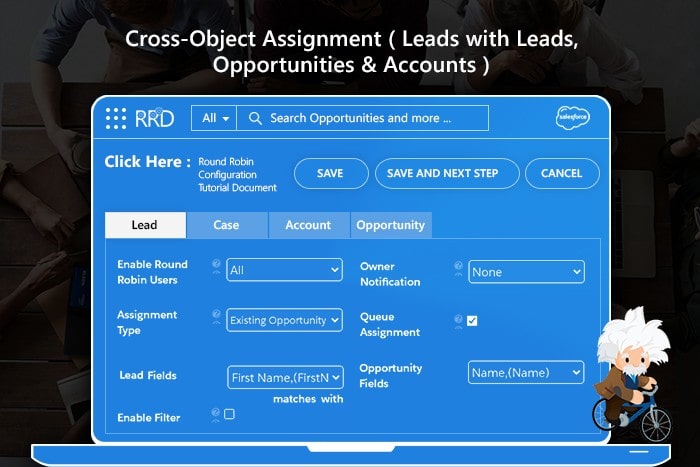
    1. Round Robin Logic: RRD uses round robin salesforce logic to assign records as they are created and loaded into your salesforce org (via API/ data import) using criteria defined for multiple Sales and Service teams in your organizations. Distributes inbound records from the queues (integrates with Omni-Channel setup) to the right Sales rep in the right team as per the load and criteria.

    2. Capacity Management: Users can define the ‘to be assigned number of records’ (volume of records and open items) which a sales rep can handle in a defined duration. This helps in salesforce load balancing and the same can also be replicated for teams and queues.

    3. Real-time distribution: The inbound records are immediately assigned to the right reps in blink of an eye. If certain records need to be assigned after enrichment and update, then the distribution run in batches ranging from a few minutes to a day.

    4. Relationship based Assignment: Assigns the records to the agent working on another/ similar case for the same client or in same geography and much more.

    5. Customizable Schedules & Calendars: The assignment to a rep can be controlled with RRD user schedules. Helpful with teams working in different time zones, when some reps are on leaves, holidays and during short day breaks.

    6. Auditing: Salesforce admins can verify every task and action from RRD Activity Log which updates the user on real-time basis on the actions performed in the application.

    Round Robin Distributor is available to download from Salesforce AppExchange, on a month’s free trial. The team remains all geared up to help setup and configure your specific use case for your Salesforce environment. Get started with Round Robin Distributor today and fast pace your complex round robin assignments!

    Maybe You Like

    Round Robin Distribution: Better alternative to Omni channel

    Round Robin Distribution: Better alternative to Omni channel

    Salesforce Round Robin Lead Assignment *Best Practice* with RRD

    Salesforce Round Robin Lead Assignment *Best Practice* with RRD

    Salesforce Lead Distribution – Efficient assignment through Round Robin Distributor

    Salesforce Lead Distribution – Efficient assignment through Round Robin Distributor

    Managing High-Priority Support Tickets like an Ace in Salesforce

    Managing High-Priority Support Tickets like an Ace in Salesforce

  • Solving Case Response Time Issues with SalesForce

    Solving Case Response Time Issues with SalesForce

    Solving Case Response Time Issues with SalesForce

    Covid-19 Pandemic has posed a significant challenge to Business Process Outsourcing Sector, and it’s now when companies realize how crucial Case Response Time can be. As the companies are down-sizing, the load of Inbound Data is increasing multifold, posing a challenge to the sector.

    But what is Case Response Time?

    Case Response Time or Service Response Time is the period between when a customer requests for service, inquires, registers a complaint, and when it is responded. It is a major contributor to a company’s potential to retain top and high priority customers.

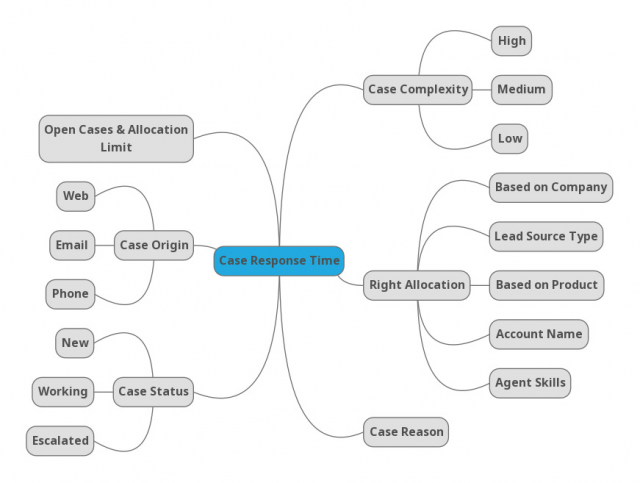
    Let us understand the factors that may impact case response time in your company

    1. Complexity of a Case: Usually, your L1 Support teams deal with problems that come under the purview and capacity of the customer to resolve by getting the minimum guidance, but, as the case complexity rises, these cases get assigned to L2 and L3 Support teams. As the complexity grows, the difficulty of an Admin/ Manager increases proportionally to assign these cases to the right people/ teams at the right time.

    2. Allocation to the Right Representative: Your Accounts and Clients want to talk to the same representative/ agent who knows their Case from the Initial Phase. Without this working relationship being successful, customers may feel like they are just a number.

    3. Reason for receiving a Case: Depending upon the product/ service, the case response time varies due to the reason for the inquiry and escalation required. The reasons could be Product Installation, Breakdown, Performance Related Issues, Breakdown, Complexity of the equipment, or the product.

    4. Status of the Case/ Enquiry: How quickly your support cases are addressed depends on the assigned severity. The distribution of a Case can also happen based on the time that went into its resolution. Managers also need to pay attention to the escalation process to surface critical issues and voice concerns if a support ticket isn’t being addressed appropriately.

    5. Case Origin: When it comes to answering complaints, the origin of the case, becomes an essential parameter for addressing the issue. Every Channel needs to have a standard response policy instead of abruptly jumping on questions and complaints.

    6. Open Cases allocated to Representative/ Service Team: To improve the efficiency and boost the productivity of the team and individual agents, it’s necessary to keep a track on the number of cases they have been allocated and the open cases in a particular period so focused case resolution could be promoted.

    salesforce case response time

    Why is Customer Response Time germane to our Service Teams?

    1. Customers do not wait for more than 6 hours for your response, according to Eptica.

    2. 90% of Americans use customer service as a factor in deciding whether or not to do business with a company, according to American Express.

    3. 54% of customers used email for customer service last year, making it the most used digital channel for customer service, according to a report by Forrester.

    4. Increasing customer retention rates by just 5% can increase profits by between 25% and 95%, according to Bain & Company.

    5. 35% of customers expect to be able to contact the same customer service agent through any communication channel, according to Zendesk.

    How can Automation overhaul your Business?

    Organizations with successful automation efforts are more likely than others to designate automation as a strategic priority, according to a 2018 McKinsey Report. Applicability of Automation across the Customer Experience category in Service and Support can form a crucial part of your organization’s Rule-based Automation. Round Robin Distributor (RRD), powered by Mirketa Inc., is one of the most powerful and intelligent Salesforce tools for your Inbound Service teams, which can help you solve your Customer Response Time-related issues and aid Management saves their working hours worrying about smart and equal ways for distribution of cases.

    How RRD solve these issues?

    1. Round-Robin based Distribution

    2. Load Balancing and Weighted Allocation

    3. Takes care of your Urgent Cases

    4. Re-assign cases to the Most-Suitable Representatives

    5. Bulk- Management of Service Teams

    6. Configurable Alerts and Smart Dashboards to track Cases and User Activities

    7. Relationship and Criteria Based Case Routing

    RRD makes it easier to assign case records in a couple of steps; Just configure the Case level Settings; Create criteria specific teams and add Users and you are good to start off 

    salesforce case response time

    It adjusts to suit your business requirements and can be customized as per your use case. Aren’t you excited already to give it a try? Just jump on to our Salesforce AppExchange page today to get a free trial!

    Maybe You Like

    Round Robin Distribution: Better alternative to Omni channel

    Round Robin Distribution: Better alternative to Omni channel

    Salesforce Round Robin Lead Assignment *Best Practice* with RRD

    Salesforce Round Robin Lead Assignment *Best Practice* with RRD

    Salesforce Lead Distribution – Efficient assignment through Round Robin Distributor

    Salesforce Lead Distribution – Efficient assignment through Round Robin Distributor

    Managing High-Priority Support Tickets like an Ace in Salesforce

    Managing High-Priority Support Tickets like an Ace in Salesforce